
🚀 Weekly Ads Monitor v 1.9.8.5
Save hours with the automated weekly Google Sheets report
Get It Free ->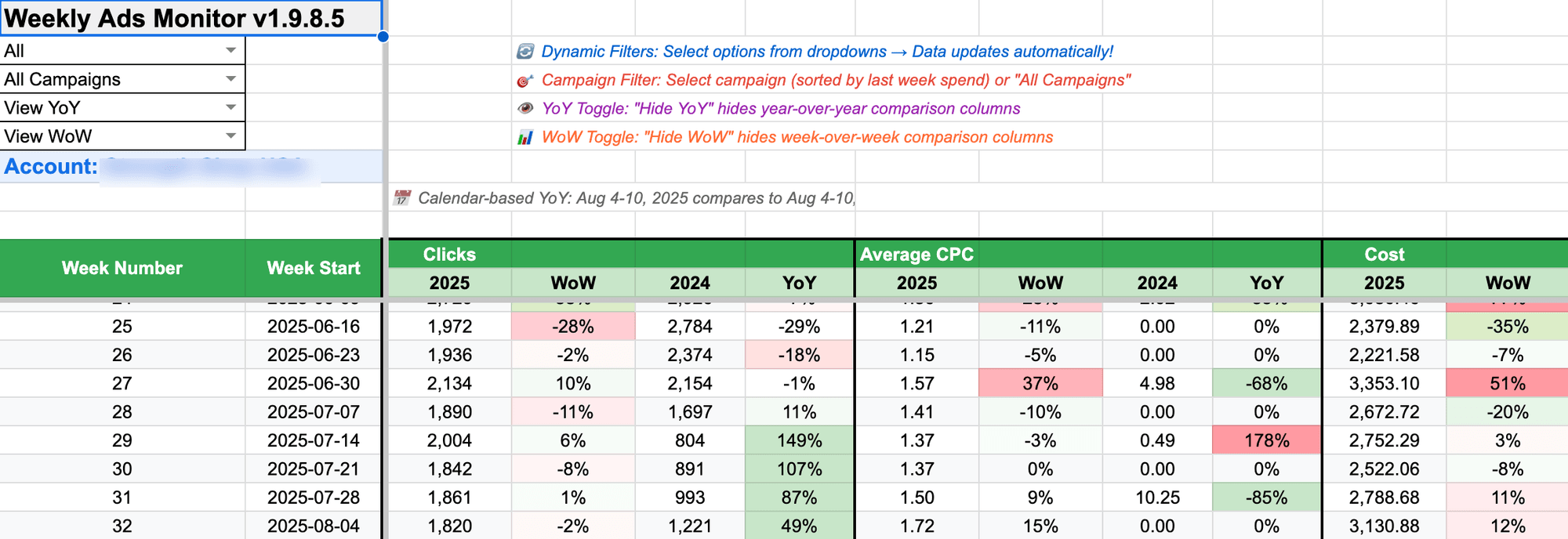
Meet Weekly Ads Monitor
✅
Direct Google Ads Integration 🔗:
• Connects directly to your Google Ads account
• Pulls all campaign data automatically
• Real-time data access through official API
• Pulls all campaign data automatically
• Real-time data access through official API
✅
🤓 Automatic Calculations:
• YoY and WoW comparisons calculated automatically
• Smart date matching for accurate comparisons
• Instant insights in under 2 minutes
• Smart date matching for accurate comparisons
• Instant insights in under 2 minutes
✅
Smart Filtering & Advanced Controls 👍:
• Campaign Type Selector - Filter by Search, Display, Shopping, PMax
or others campaign types
• Individual Campaign Selector - Filter by specific campaign with cost display for easy selection
• Configurable Week Start - choose between Monday or Sunday week starts
• Real-time Updates - change filters and see results immediately
• Dynamic Toggle Controls: - Show/hide YoY and WoW columns instantly with intuitive "View/Hide" labels
• Conversion-Time Metrics: - Track conversions and conversion value by actual conversion date for accurate attribution
• Individual Campaign Selector - Filter by specific campaign with cost display for easy selection
• Configurable Week Start - choose between Monday or Sunday week starts
• Real-time Updates - change filters and see results immediately
• Dynamic Toggle Controls: - Show/hide YoY and WoW columns instantly with intuitive "View/Hide" labels
• Conversion-Time Metrics: - Track conversions and conversion value by actual conversion date for accurate attribution
✅
Key Metrics Tracked 🕵️:
• Complete Coverage - Clicks, Cost, Avg. CPC, CPA, Conversions (by conv.
time), Conv. Value (by conv. time), ROAS (by conv. time)
• Trend Identification - Spot performance changes before they become problems
• Color-coded performance indicators for quick insights
• Trend Identification - Spot performance changes before they become problems
• Color-coded performance indicators for quick insights
✅
Professional Presentation 💼:
• Conditional Color Coding - green for improvements, red for declines
• Clean Number Formatting: - Currency-agnostic display for universal compatibility
• Enhanced Percentage Display - clear percentage formatting (124% vs 1.24)
• Clean, Professional Formatting - ready for client presentations
• Clean Number Formatting: - Currency-agnostic display for universal compatibility
• Enhanced Percentage Display - clear percentage formatting (124% vs 1.24)
• Clean, Professional Formatting - ready for client presentations
Fresh data each Monday. No manual work, no costs, no setup.
👌Perfect For:
📈
Google Ads Managers
Generate client reports in minutes, not hours
Present professional insights with confidence
Track performance trends across all campaigns
Present professional insights with confidence
Track performance trends across all campaigns
🏢
Marketing Agencies
Standardize reporting across all clients
Reduce manual work and increase billable hours
Deliver consistent, professional reports
Reduce manual work and increase billable hours
Deliver consistent, professional reports
👤
Solo PPC Consultants
Focus on strategy, not data entry
Present like a big agency with professional reports
Scale your business without hiring more staff
Present like a big agency with professional reports
Scale your business without hiring more staff
💼
Business Owners
Understand your ad performance at a glance
Make data-driven decisions with confidence
Track ROI trends over time
Make data-driven decisions with confidence
Track ROI trends over time
How It Works (Seriously, It's This Simple)
📂
1: Setup Once
Download the script (takes 30 seconds).
⏩
2: Run Weekly
Schedule the script to run weekly to fetch fresh data.
⏰
3: Analyze Instantly
Get professional reports with YoY and WoW comparisons.
Your time’s too valuable for manual monitoring.
Frequently Asked Questions:
Q: Do I need any technical skills to set this up?
A: Nope. If you can copy and paste text, you can install this. The setup guide walks you through every click.
Q: Will this work with my Google Ads account?
A: Yes, it works with any Google Ads account. The script pulls data directly from Google's official API.
Q: How often does the data update?
A: You can schedule it to run weekly (recommended) or daily. Most people set it to run early Monday mornings for fresh weekly insights.
Q: Is my data secure?
A: Absolutely. The script runs within your own Google Ads account and creates spreadsheets in your own Google Drive. No data leaves your control.
Q: Can I customize which campaigns are included?
A: Yes! You can specify brand campaigns to exclude and filter by campaign type. The dashboard updates automatically based on your selections.